How to Remove GST From a Total
Updated September 2026
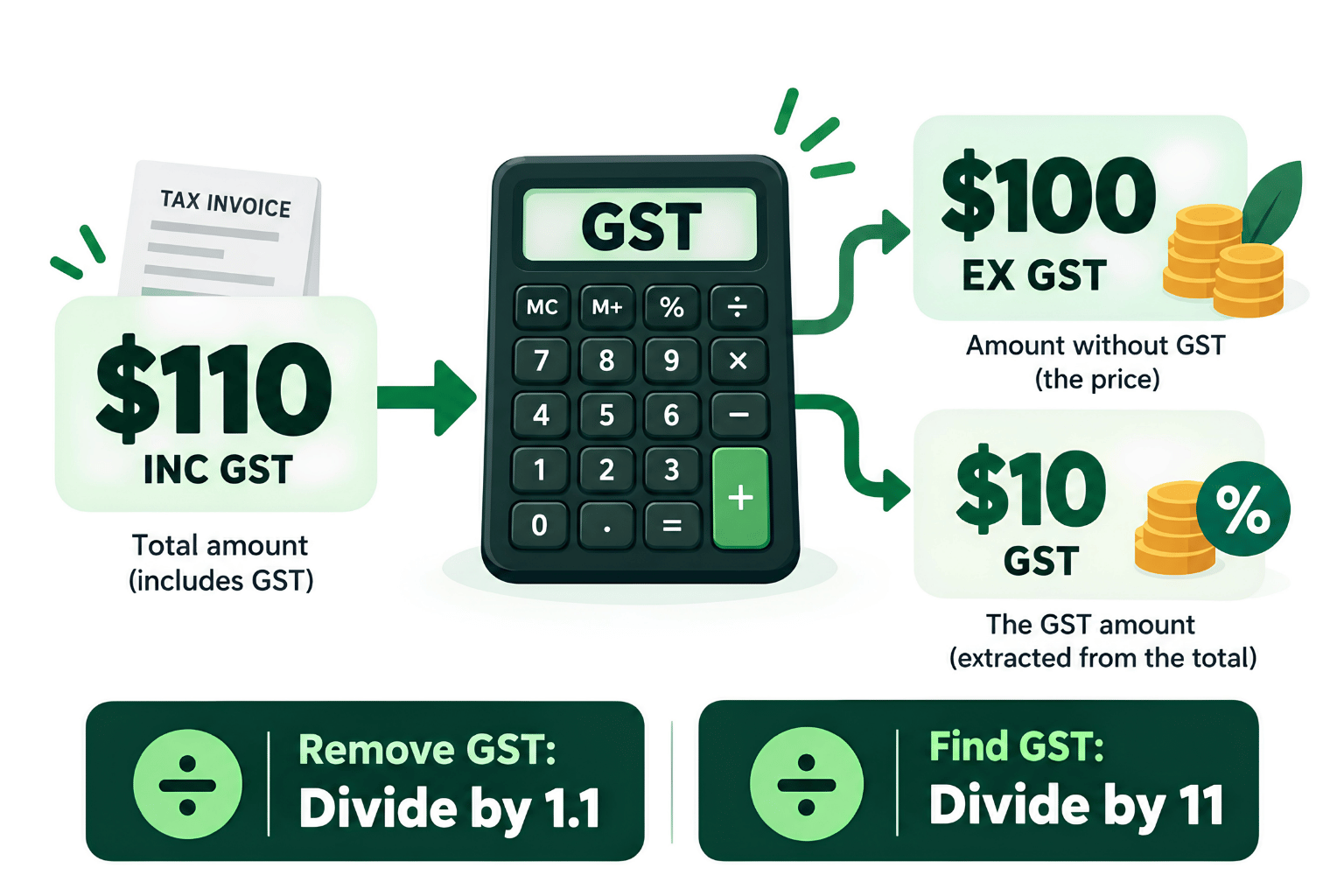
To remove Australian GST from a GST-inclusive total, divide the total by 1.1. This gives you the price before GST.
To find only the GST component included in the total, divide the total by 11.
For example, if the total is $110 including GST:
- Ex-GST amount: $110 ÷ 1.1 = $100
- GST component: $110 ÷ 11 = $10
These formulas apply when the full amount includes GST at the standard 10% rate.
On this page
Useful calculators
On this page
The two GST calculations you need
When working backwards from a GST-inclusive price, there are two slightly different calculations.
To remove GST from the total
For a $550 GST-inclusive purchase:
To find the GST component
For the same $550 purchase:
| Amount | Value |
|---|---|
| Total including GST | $550.00 |
| Amount excluding GST | $500.00 |
| GST component | $50.00 |
You can check the result by adding the GST back:
If you don't want to calculate this manually, you can use our GST Calculator to work out the GST-inclusive amount, ex-GST amount and GST component.
Why can't you just subtract 10%?
This is the most common mistake when removing GST from a total.
Suppose a customer pays $110 including GST.
Taking 10% off $110 gives:
But $99 is not the original price. The correct ex-GST amount is $100.
That's because the original GST was calculated on the $100 price before GST:
The final price became:
Once GST has been added, the $110 total represents 110% of the original price. Dividing by 1.1 takes you back to 100%.
Another way to think about it is that a GST-inclusive total contains 11 equal parts: 10 parts are the original value and one part is GST. That's why dividing the total by 11 gives you the GST component.
Australian Government guidance describes GST as 10% on most goods and services, with the GST component of a standard GST-inclusive price equal to one-eleventh of the total.
Worked examples
Removing GST from a supplier purchase
A sole trader buys equipment for $1,100 including GST.
To find the amount before GST:
To find the GST component:
Summary:
GST-inclusive purchase: $1,100
Ex-GST amount: $1,000
GST component: $100
Working out that $100 GST component does not, by itself, mean the business is entitled to claim it as a GST credit. GST-credit eligibility depends on the GST rules applying to the particular purchase.
Working backwards from a client's budget
Suppose a client says their maximum budget is $5,500 including GST.
To find the maximum service fee before GST:
GST:
The quote can therefore be structured as:
Service fee: $5,000 ex-GST
GST: $500
Total payable: $5,500 inc-GST
This is useful when a customer gives you a fixed GST-inclusive budget and you need to know the underlying price before GST.
Quick reference
| GST-inclusive total | Ex-GST amount | GST component |
|---|---|---|
| $55.00 | $50.00 | $5.00 |
| $110.00 | $100.00 | $10.00 |
| $550.00 | $500.00 | $50.00 |
| $1,100.00 | $1,000.00 | $100.00 |
| $5,500.00 | $5,000.00 | $500.00 |
When you can't simply divide the whole total by 11
The divide-by-11 method works cleanly when the entire GST-inclusive amount relates to supplies taxable at 10%.
That isn't always the case.
The invoice contains GST-free or non-taxable items
A receipt can contain items with different GST treatments.
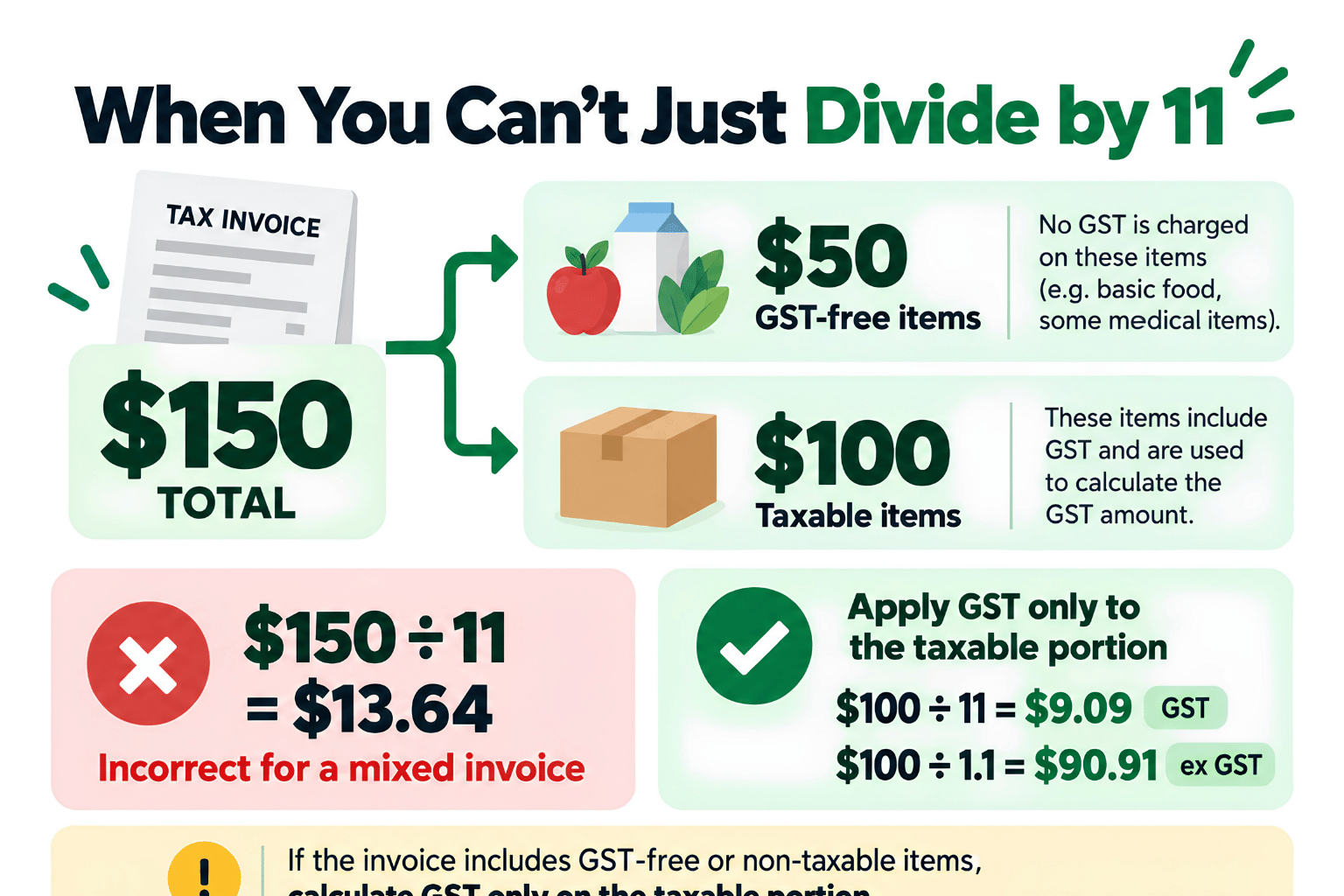
Suppose an invoice totals $150, made up of:
- $50 of GST-free items
- $100 of taxable items, including GST
You should not calculate:
That would incorrectly treat the entire purchase as taxable.
Instead, apply the calculation only to the taxable $100 portion:
The taxable amount before GST is:
The figures are therefore:
GST-free portion: $50.00
Taxable portion before GST: $90.91
GST: $9.09
Total: $150.00
ATO guidance distinguishes mixed supplies from composite supplies. Where a supply has separately identifiable taxable and non-taxable parts, the consideration generally needs to be apportioned so GST can be calculated on the taxable part.
The supplier isn't registered for GST
Not every business purchase contains GST.
A business that isn't registered for GST does not add GST to its prices. If no GST was charged, you cannot create a GST amount simply by dividing the purchase price by 11.
Before reversing GST from an expense, check whether GST was actually included.
Calculating GST doesn't automatically mean you can claim it
Finding the GST component of a purchase is a mathematical calculation. Claiming that GST as a credit is a separate tax question.
The ATO sets conditions for claiming GST credits, including whether:
- your business is registered for GST
- GST was included in the purchase price
- the purchase was for business use
- you are liable to pay for the purchase
- you hold the required records or tax invoice.
For purchases of more than $82.50 including GST, you generally need a tax invoice to claim the GST credit.
Private use, purchases connected with input-taxed activities and other circumstances can also affect how much GST you can claim.
If you're unsure whether GST applies to a transaction or whether you're entitled to a credit, check the relevant ATO guidance or obtain advice for your circumstances.
How to remove GST in Excel or Google Sheets
If the GST-inclusive amount is in cell A2, use:
Ex-GST amount:
GST component:
For example, if A2 contains 880:
- =ROUND(A2/1.1,2) returns 800.00
- =ROUND(A2/11,2) returns 80.00
Using ROUND keeps the result to two decimal places, which is useful when working with currency.
You may occasionally see a one-cent difference between a manual calculation and the GST shown on a multi-line supplier invoice. The ATO permits recognised rounding methods for invoices containing multiple taxable sales, so small rounding differences can occur.
How does this relate to your BAS?
For businesses using Simpler BAS, GST on sales is reported at 1A and GST on purchases at 1B.
The important distinction is that calculating the GST component of a sale or purchase does not determine whether it belongs on your BAS. The underlying transaction still needs to meet the relevant GST rules.
For example, a purchase may contain no GST, contain a mixture of taxable and GST-free items, or only be partly related to business use.
FAQs
Do I divide by 11 or 1.1?
It depends on what you're trying to find. Divide by 1.1 when you want the price excluding GST. Divide by 11 when you want only the GST amount included in the total. For a $110 GST-inclusive amount: $110 ÷ 1.1 = $100 ex-GST; $110 ÷ 11 = $10 GST.
Can I remove GST from every business expense?
No. First check whether GST was actually included in the amount. GST-free purchases, some input-taxed transactions and purchases from businesses that aren't registered for GST may contain no GST to remove. Mixed invoices may also require you to calculate GST only on the taxable portion rather than the full total.
Can I claim the GST I calculate from a receipt?
Not necessarily. Calculating the GST component does not automatically make that amount claimable as a GST credit. You generally need to be registered for GST and satisfy the ATO's requirements for the particular purchase. For purchases of more than $82.50 including GST, you generally need a tax invoice to claim the GST credit.
The bottom line
For a standard GST-inclusive Australian price, divide by 1.1 to find the price before GST and by 11 to find the GST component. Before using either calculation, check that GST actually applies to the full amount.
Sources & References
Related Calculators
Related Guides
General information only. This information is general in nature and does not take account of your individual tax, accounting or financial circumstances.